
Hennebach Program
Upcoming Events

Our mission is to enhance the profile of the humanities at Colorado School of Mines by means of interdisciplinary humanities education, research, and outreach.
Our vision is to make the humanities a strong, integral feature of the teaching and research activities at Colorado School of Mines.
The Hennebach Program in the Humanities’ is built on the Hennebach Visiting Professorship endowment that was established in 1991, thanks to a major endowment from Ralph Hennebach ’41. Since 1995, the Hennebach Program in the Humanities has supported a series of visiting scholars to help make the humanities an essential component of any education at the Colorado School of Mines.
Given increased recognition of the importance of the humanities in science and engineering education, the Hennebach Program provides opportunities to meet the needs of students who aspire to assume leadership roles in the technical world. Such students benefit from focused studies in the humanities that complement their technical degree curricula.
Visiting professors have included scholars in classics, environmental studies, ethics, history, literature, philosophy and social theory as well as the interdisciplinary fields of environmental policy and science/technology and society studies. Visiting scholars support the humanities through course offerings, lectures, workshops and collaboration on projects and research.
Ralph L. Hennebach, 1920-2008
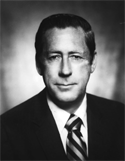 In memory of his father and family, Ralph L. Hennebach ’41 in 1991 established the Hennebach Visiting Professorship in the Humanities. This professorship assists the Department of Humanities, Arts, and Social Sciences in faculty development by bringing exceptional humanities and social science talent to campus. Mr. Hennebach’s leadership gift further persuaded ASARCO Inc. to join him in meeting a challenge grant from the National Endowment for the Humanities designed to strengthen the liberal arts in engineering education at CSM. When making the gift, Mr. Hennebach envisioned that visiting professors would stimulate interest and inspire students to further pursue the humanities.
Ralph L. Hennebach was born in Garfield, Utah, where his father was employed as a metallurgist. When his father became superintendent of the Leadville Smelter and Refinery the family moved to Leadville, Colorado, where the young Ralph grew up and began his career with the American Smelting & Refining Co. (now ASARCO) as carpenter’s assistant. After graduating from CSM, Mr. Hennebach joined ASARCO as a chemist in the El Paso laboratory, subsequently becoming an assayer and plant metallurgist. Mr. Hennebach served as a lieutenant in the U.S. Navy (1944-1946). After his service he returned to Denver to marry Mary Louise Johnston and then rejoined ASARCO as assistant superintendent of the Hayden, Arizona, copper smelter. In 1948 he was transferred back to El Paso and put in charge of a new stag fuming plant. In 1952 he attended MIT as a Sloan Fellow and after earning in MBA in 1953 spent two and a half years in the ASARCO New York office as an ore buyer. In 1955 he was promoted to assistant manager of the Western Department in Salt Lake City. In 1958 he became assistant to the vice president, smelting and refining, New York; then in 1963 vice president of smelting and refining ASARCO. In 1964 he assumed the position of director; in 1966 executive vice president; in 1971 president; and in 1982 CEO and chairman of the board of ASARCO. He retired in 1985. Mr. Hennebach served as a director of many boards and was a great supporter of Mines. He and his wife of 61 years raised their family in Short Hills, New Jersey, and enjoyed playing golf and traveling. At his death, Ralph Hennebach was survived by his wife, Mary Louise; his son, Mark; his daughters, Anne Kirspel and Margo Hennebach; his sister, Carmen Fisher; and six grandchildren.
Humanities in Engineering
The Humanities in Engineering helps turn a technical education into an expansively human one.
In a world progressively defined by engineered design and technical management, the humanities are called on to further understand the technical world. Likewise, engineering and the applied sciences — as they seek to serve the non-technical world — are increasingly called on to incorporate humanities perspectives into education and practice.
Since the 1970s, the U.S. National Science Foundation has funded programs to promote the development of professional engineering ethics. During the 1980s and 1990s professional engineering societies expanded activities related to the formulation and implementation of ethical codes of conduct. In 2000, ABET (Accreditation Board for Engineering and Technology) began to require the teaching of engineering ethics in programs seeking technical accreditation. From such concerns has emerged the awareness of the importance of the humanities and liberal arts in engineering education.
Ethics is just the beginning. Like the sciences and the social sciences, engineering is called upon to become self-reflective in order to realize its leadership potential. To assist in this advancement, the humanities support CSM’s commitment to engineering knowledge and technical skills in the areas of Earth, Energy, Materials, and Environment. Through the humanities CSM further promotes self-knowledge, intelligent citizenship, and critical participation in public life, turning a technical education into an expansively human one.
Hennebach Lectures
No items, feed is empty.
My involvement with literature and the other humanities has broadened me and greatly enriched my life, and I hope to help others have the same experience.
Ralph L. Hennebach
Since the Hennebach Program in the Humanities began bringing in multiple visiting scholars each year, the program has more significantly enhanced the visibility of humanities-related research and teaching at Mines. Also, we have seen an increased interest in these talks from a wide spectrum of campus and off-campus community members. In that sense, the Hennebach Program is helping to bridge real or perceived technical-social divides while augmenting an overall appreciation for what the humanities have to offer.
Jon Leydens, Professor
There is no question in my mind that a program such as the Hennebach will help round out the education of Mines students—and that of faculty as well!
Jon Leydens, Professor
Contact Us
Seth Tucker is the Director, who consults with an advisory committee and reports to the Provost and Department Head of HASS.
For questions, call 303-273-3628, or email stucker@mines.edu.
The advisory committee is composed of faculty from all ranks:
- Seth Tucker
- Tina Gianquitto
- Derrick Hudson
- Toni Lefton
- Shannon Mancus
- Jay Straker
Current & Past Seminar Events
Spring 2022
EKPHRASTIC SOUND! MUSICAL PERFORMANCE BY ITCHY-O!
April 29, 2022 5:30pm – 08:00pm
Green Center
Join the Hennebach Program in the Humanities alongside MME and local and regional award-winning writers, poets, and artists for an Ekphrastic evening of lights, art, and sound!
Ekphrastic art is simply this: it is when one art form (such as poetry) is used to inspire or inquire or impress on another (such as music). So a new musical score written to honor a poem would be ‘ekphrastic art.’ This event will be the cumulative effort by the Hennebach program and MME to design, forge, craft, tune, and create new instruments from melted down used instruments in order to create totally unique sounds for the experimental science music group Itchy-O, who will then perform for the Mines community on the evening of the 29th. This will be a unique and signature experience and is open to everyone.
NATIONAL POETRY MONTH WITH AWARD-WINNING POET ROGER REEVES!
April 07, 2022 5:30pm
CTLM 102
Join us in celebrating award-winning poet Roger Reeves’ new book, “Best Barbarian”—a mesmerizing second collection from Reeves (King Me) reflects intergenerational racial trauma and personal tragedy with a remarkable balance of acute feeling and lyrical precision. These poems powerfully allude to the ways in which racial atrocity is sewn into the fabric of America. His poems move across time and space, referencing the 16th Street Baptist Church bombing in 1963 Birmingham (which killed four children), all the way to a biblical fable of a man named Ezra as Reeves’ guide, encountering the spirits of formerly enslaved people and giving voice to the impulse of rebellion against the white supremacist state. With vivid images and haunting, evocative language, Reeves memorably places the reader in the space where life and death intersect (Publishers Weekly).
HENNEBACH EVENT: BECOME! ART! EKPHRASTIC SOUND EXPERIENCE PART 2
April 02, 2022 6:00pm – 8:00pm
Hill Hall 125
HENNEBACH EVENT: AN EVENING OF ECOPOETICS WITH PROFESSOR ARTHUR SACKS
March 16, 2022 6:00pm – 7:00pm
Hill Hall 204
Professor Sacks will discuss the artistic and social roles of the poet and poetry, the development of American ecopoetics, integrative and other poetic approaches that have influenced his writing, and will present some of the poems he has written over the past 60 years.
Doctor Arthur Sacks is Professor Emeritus of Environmental Studies, Film Studies, and English at the Colorado School of Mines and was founding Director of what is now the Humanities, Arts and Social Sciences Department. While at Mines, Professor Sacks held positions as Associate Provost and as Director of the McBride Honors Program. He has a BA (Brooklyn College) and MA/Ph.D. (UW-Madison) all in English Literature. Prior to Mines, Professor Sacks was Director of the Nelson Institute for Environmental Studies at University of Wisconsin-Madison. Over his career he has advised Ministers of Environment, Education, and Health for the USSR, Russia, Kyrgyzstan, India, China, Indonesia, and Chile – as well as directors of UNEP, UNESCO, and UN Environmental Education Caucus. He served as President of the North American Association for Environmental Education, and the Deputy Secretary General of the International Society for Environmental Education. In retirement he is completing a volume of collected poetry called Birdtalk. This volume incorporates his perspectives on the interconnection of environmental and human systems, aligning much of his poetry with the American ecopoetics movement of the past 50 years
HENNEBACH EVENT: BECOME! ART! EKPHRASTIC SOUND EXPERIENCE
March 05, 2022 6:00pm – 8:00pm
Hill Hall 125
HENNEBACH LECTURE SERIES: Using mixed methods to understand the political ecology of small-scale mining in ghana
Dr. Heidi Hausermann
February 23, 2022 4:00pm – 5:00pm
Hill Hall 204
Dr. Heidi Hausermann is an Associate Professor of Geography at Colorado State University. Her expertise is in landscape change, disease dynamics, politics of extraction and mixed methods.
Artisanal and small-scale gold mining activities hugely expanded in the wake of the 2008 economic recession and, most recently, the global pandemic. Based on 10 years of mixed methods research, this talk explores the political, environmental and health dimensions of gold mining in Ghana. I argue while
foreign “small-scale” mining is often framed as “illegal,” these activities are enabled through complicated political and development relations between Ghana and China. Combining remote sensing, ethnography, and quantitative techniques, I argue there is nothing “small-scale” about Ghana’s recent mining boom:
from spatial extent to impacts on food security and malaria, recent mining activities have profoundly reshaped rural landscapes and everyday life in Central Region. The talk concludes with examples of how this research informs environmental justice practices and policy in Ghana.
HENNEBACH LECTURE SERIES: Translating the Lyric with poet Wayne Miller
Wayne Miller
January 13, 2022 5:30pm – 6:30pm
Marquez Hall 126
Please join the Hennebach Program as we launch our Spring 2022 season of events with award-winning poet and translator Wayne Miller as he reads from his new poetry collection, We the Jury, and talks about the value of literary translation both broadly and in the context of his own writing.
Fall 2021
HENNEBACH LECTURE SERIES: EDUCATION IN AFGHANISTAN: PROMOTING LOCAL SOLUTIONS TO ADDRESS COMPLEX REALITIES
Dr. Zuhra Faizi
October 28, 2021 6:00pm – 7:00pm
Marquez Hall 126
Education in Afghanistan, particularly girls’ education, is making headlines again as education policies and structures are rearranged under the new government of Taliban. While discourse on education in Afghanistan is embedded with assumptions about the Afghan culture and Islam, a closer examination of past and present education policies of the country reveals pragmatic obstacles to access and quality as well as more entrenched concerns about social engineering. In this lecture, Dr. Faizi provides an analysis of education in Afghanistan, weaving history and culture with local perspectives and experiences, to offer a more complex understanding of the challenges to education. With these challenges in mind, possibilities for ways forward also become more complex and locally situated. Dr. Faizi will then present her research on the ways community-based education addresses local concerns as well as resource limitations.
HENNEBACH LECTURE SERIES: we don’t know what we want, we don’t know what we know
Elisa Gabbert
November 18, 2021 6:00pm – 7:00pm
Marquez Hall 126
Join Author Elisa Gabbert for a discussion of the mysterious locus of control, exploring bias and competing interests, failings of memory and perceptions, the unconscious, parasitic mind control, the problem of free will and other ideas with troubling implications for how we view, interpret and respond to reality.
HENNEBACH Event: Mines iron pour
December 11, 2021 2:30pm – 6:30pm
Marquez Hall 126
Free Iron Mold Experience
2:30 – 4:30 pm – Show us your artistic skills with sand scratch molds-these will be filled with liquid iron and you can keep the art for free!
The Iron Pour Experience
5:30 pm – Watch your art come to life in a striking spectacle of fire and sound!
Spring 2021
ENGINEERING AND CAPITALISM: A FRAUGHT RELATIONSHIP, WITH PROFESSOR CARL MITCHAM
Professor Carl Mitcham
January 25th, 2021 4:00 – 5:00 PM
ZOOM
Last year in Steps toward a Philosophy of Engineering, Professor Carl Mitcham reviewed some 30 years of an effort to reflect critically on engineering. In the process it became apparent that an important missing element, in his work as well as in that of many others, was critical examination of the relationship between English-speaking engineering and capitalism. This lecture topic is thus an appendix to the book that points toward further work. It will sketch the interacting histories of engineering and capitalism in order to consider the extent to which generally recognized criticisms of capitalism pose challenges to engineering. The thesis is that engineering is complicit with both the achievements and the problems of capitalism.
ON WRITING OURSELVES: AN EXPLORATION OF LATINX IDENTITY AND REPRESENTATION) WITH THE NOVELIST AND PROFESSOR PATRICIA ENGEL
Patricia Engel
February 2, 2021 4:00 – 5:00 PM
ZOOM
Patricia Engel will lead a reading of her work along with a discussion focused on the difficulties and existential dilemmas that Latinx writers and scholars specifically face in defining themselves and their work in relation to (and in opposition to) current and historical barriers reinforced by stereotypes, dislocation, and diaspora.
REIMAGINING ENGINEERING THROUGH THE EYES OF BLACK WOMEN EDUCATORS: A CONVERSATION WITH WALTER LEE
Dr. Walter Lee
February 23rd, 2021
ZOOM
As issues related to diversity, equity, and inclusion continue to surface, it’s clearly evident that something isn’t working. So, what about engineering should change? Dr. Walter Lee and members of his research group are actively working towards finding answers to this question. Please join us for a conversation.
REMEMBER THE FLIGHT: WRITING AND RE-WRITING IRANIAN WOMEN’S LIVES
Jasmin Darznik
March 2, 2021
ZOOM
Novelist and literary scholar Jasmin Darznik discusses how Forugh Farrokhzad, Iran’s rebel poet, has been transformed and re-imagined outside of Iran, offering new possibilities for how Iranian women are seen–and see themselves–in America and beyond.
WE NEED NEW MYTHS: A TALK WITH FILM-MAKER AND NOVELIST LALEH KHADIVI
Laleh Khadivi
March 9, 2021
ZOOM
The world is changing faster, and more intensely, than ever. How are we to reconcile the realities of identity, cultural integrity and humility and compassion as we tick closer to 8 billion souls? We will discuss the ways in which, art, mythology and writing in particular, can possibly serve to pave the way forward into a future of less antagonism and confusion and increased creative cooperation. Given the way things are going, we will need it.
HENNEBACH PANEL WITH JASMIN DARZNIK, PATRICIA ENGEL, LALEH KHADIVI FOCUSED ON IDENTITY, GENDER, IMMIGRATION ISSUES AND BIPOC CONCERNS IN THE US WITH THREE PROMINENT WRITERS
Jasmin Darznik, Patricia Engel, Laleh Khadivi
March 16, 2021
ZOOM
Join prominent novelists and film-makers Jasmin Darznik, Patricia Engel, Laleh Khadivi for a discussion on issues facing women scholars and artists.
NATIONAL POETRY MONTH READING WITH JOHN MURILLO!
John Murillo
April 22, 2021
ZOOM
Join the Hennebach Program in the Humanities for a celebration of poetry with the Kingsley Tufts Winner John Murillo!
“Murillo is a true poet, a wordsmith, and a song-maker, intelligent, principled, compassionate, and fearless… Leave the idea that ‘poetry makes nothing happen’ to the poets whose poetry makes nothing happen. John Murillo will provide salvation to those who need poetry to save them.”
Fall 2020
FELON: A POETIC AND IMMERSIVE PLAY — A DISCOURSE ON RACE, INCARCERATION, JUSTICE
R. Dwayne Betts
October 14, 2020
R. Dwayne Betts will present an excerpt of the solo show that he is developing based on “Felon.” The work engages with the contemporary moment, mass incarceration, and the challenges of having a complicated conversation about crime, punishment, and sorrow in contemporary America. This presentation essentially takes place in three parts. First, there is the excerpt of the solo show. Secondly, there is a brief discussion that frames the show in the broader context of literary work written that engages with the issues that feel so vital today and are so vital today but are also feature returns to past poetics, particularly a return to issues essential to understanding and engaging in the work of Etheridge Knight, Lucille Clifton, and John Edgar Wideman. Finally, there will be a question and answer section that allows Dwayne to explore these issues with the audience
BLACK NATURE: RACE AND THE ENVIRONMENT
Hennebach Lecture
Camille T. Dungy
October 27, 2020
R. Dwayne Betts will present an excerpt of the solo show that he is developing based on “Felon.” The work engages with the contemporary moment, mass incarceration, and the challenges of having a complicated conversation about crime, punishment, and sorrow in contemporary America. This presentation essentially takes place in three parts. First, there is the excerpt of the solo show. Secondly, there is a brief discussion that frames the show in the broader context of literary work written that engages with the issues that feel so vital today and are so vital today but are also feature returns to past poetics, particularly a return to issues essential to understanding and engaging in the work of Etheridge Knight, Lucille Clifton, and John Edgar Wideman. Finally, there will be a question and answer section that allows Dwayne to explore these issues with the audience
NATURE, RACE, AND WRITING
Aimee Nezhukumatathil
October 29, 2020
Born to a Filipino mother and Malayali-Indian father, Aimee Nezhukumatathil (neh-ZOO / koo-mah / tah-TILL) is the author of four books of poetry: Oceanic; Lucky Fish, winner of the Hoffer Grand Prize for Prose and Independent Books; At the Drive-In Volcano; and Miracle Fruit. With Ross Gay, she co-authored Lace & Pyrite, a chapbook of nature poems (Organic Weapon Arts). Her most recent publication is the highly anticipated World of Wonders, her first book of essays. She is the poetry editor of Orion magazine and her poems have appeared in the Best American Poetry series, American Poetry Review, New England Review, Poetry, Ploughshares, and Tin House. Awards for her writing include an NEA Fellowship in poetry and the Pushcart Prize. She is professor of English and creative writing in the MFA program of the University of Mississippi.
EMPATHY AND FORGIVENESS
Marleen Ramsey
November 4, 2020
Empathy and Forgiveness: Seeing the heart of the enemy as a Servant Leader with Marleen Ramsey
POST-ELECTION LECTURE SERIES: HEALING OUR COUNTRY THROUGH LEADERSHIP AND IDENTITY
Norman Coultier
November 5, 2020
Author James Baldwin once wrote to his nephew, “For this is your home, my friend, do not be driven from it; great men have done great things here, and will again, and we can make America what America must become.” But what lengths are we willing to travel to activate the beliefs and values that anchor our national, spiritual and personal ideals. Submission to truth means rising down into humility and abandoning mythical images of the United States, its culture and its history. The emergent hyper-volatility of our landscape requires a different kind of leadership that begins with authentic introspection and humanizing love of the Good Samaritan. Norman will illustrate how courageous confrontation with self is “the rudder” to the passionate wind of a nation’s “seafaring soul.”
FORGIVENESS AND POWER IN AN AGE OF ATROCITY: SERVANT-LEADERSHIP AS A WAY OF LIFE WITH SHANN RAY FERCH
Shann Ray Ferch
November 10, 2020
In a time of personal and political upheaval, what brings peace, what secures greater justice, and what draws us into greater individual and communal beauty? Dr. Ferch considers the essence of ultimate forgiveness, the consciousness to live well with others, and the prophetic vision of Coretta Scott King and Martin Luther King Jr.’s beloved community.
HEALING OUR COUNTRY EVENT: THE JUSTICE AND FORGIVENESS PANEL
The REPARATION AND FORGIVENESS Panel with Norman Coultier, Shann Ray Ferch, and Marleen Ramsey: experiential event on leadership, forgiveness, charity, and race
November 11, 2020